How to Build an AI Agent: Step-by-Step Guide (No Code Required) | AIToolCrux
Author: AIToolCrux Editorial Team
Category: AI Agents
Date: 2026-10-10
Word count: ~2070
Status: [DRAFT]
How to Build an AI Agent: Step-by-Step Guide (No Code Required)
Quick Answer (bottom line): You can build a working AI agent in under an hour in 2026 without writing a single line of code by using n8n's visual AI Agent node — connect a trigger, an LLM (OpenAI, Claude, or a local model via Ollama), memory, and tools on a canvas, and you have an agent that plans, calls tools, and completes multi-step tasks. The whole setup costs $0 on the free self-hosted Community Edition (plus ~$5-20/mo for a VPS if you self-host) or from ~€20/mo on n8n Cloud. This guide walks through the exact 6-step build from trigger to tested agent, including the system prompt that makes it reliable.
Key Takeaways
- The AI Agent node is a LangChain wrapper: it manages the reasoning loop — receive input, decide which tools to use, call them, and produce a response.
- You need 4 pieces: a trigger (how the agent starts), a chat model (the brain), memory (context), and tools (capabilities).
- No-code ≠ no thinking: the system prompt decides reliability. A precise "who you are + what you can do + when to escalate" prompt separates a good agent from a flaky one.
- Tools Agent > classic ReAct: native tool-calling is noticeably more reliable than the older ReAct loop in 2026.
- MCP unlocks external tools: n8n agents can consume MCP tools and expose workflows as MCP servers — a capability most no-code platforms lack.
- Test with one real workflow first: don't build a mega-agent. Build one agent, run it on a real task, measure, then expand.
What Is an AI Agent, Really?
An AI agent is a system that pursues a goal across multiple steps: it receives input, plans, decides which tools to use, executes actions, and keeps working until the outcome is reached. The key difference from a chatbot is autonomy — the agent chooses the sequence of steps, not you. If the terminology is new, our AI Agent vs Chatbot: What's the Difference in 2026 explains the architectural differences in plain language, and Best AI Agents 2026: 15 Autonomous Tools That Actually Work shows the market landscape.
This guide builds a support-research agent: it takes a customer question, searches your knowledge base, pulls current web info, and answers with sources — escalating when confidence is low.
Before you build, decide the goal — not the tool. The single biggest beginner mistake we see (in Reddit threads and our own testing) is picking a platform first and inventing a use case second. Write down one task you want automated this week — "answer customer questions from our docs," "summarize competitor pricing into a weekly email" — and build exactly that. A narrow, working agent beats a broad, flaky one every time. The n8n template library (n8n.io/workflows) is a fast source of production-ready starting points: the "Beginner manager agent with sub-agent tools" template we use below comes straight from there.
What You Need Before You Start
| Item | What for | Cost |
|---|---|---|
| n8n (Community or Cloud) | The visual canvas | Free self-host / ~€20/mo Cloud |
| An LLM API key (OpenAI / Anthropic) | The agent's brain | Pay-per-use, ~$5-20/mo at hobby volume |
| (Optional) SerpAPI or similar | Web search tool | Free tier available |
| (Optional) A Slack/Telegram webhook | Output channel | Free |
If you already use n8n, skip to Step 3. Otherwise, deploy n8n via Docker in ~10 minutes (docker-compose.yml from n8n docs) or start the 14-day Cloud trial. Our n8n Review 2026: The Best Self-Hosted AI Workflow Automation Platform covers deployment and pricing in detail.
Step 1: Create Your Workflow and Trigger
Open n8n, create a new workflow, and add a trigger node — the agent's "perceive" layer. Options:
- Chat Trigger — a web chat window to test interactively (easiest for the first build). Enable "Public URL."
- Webhook — the agent starts when an external system calls it.
- Cron — the agent runs on a schedule (e.g., every morning at 9:00).
- Email / Form — the agent starts from an incoming email or form submission.
For the first build, use Chat Trigger so you can chat with your agent while testing.
Step 2: Add the AI Agent Node
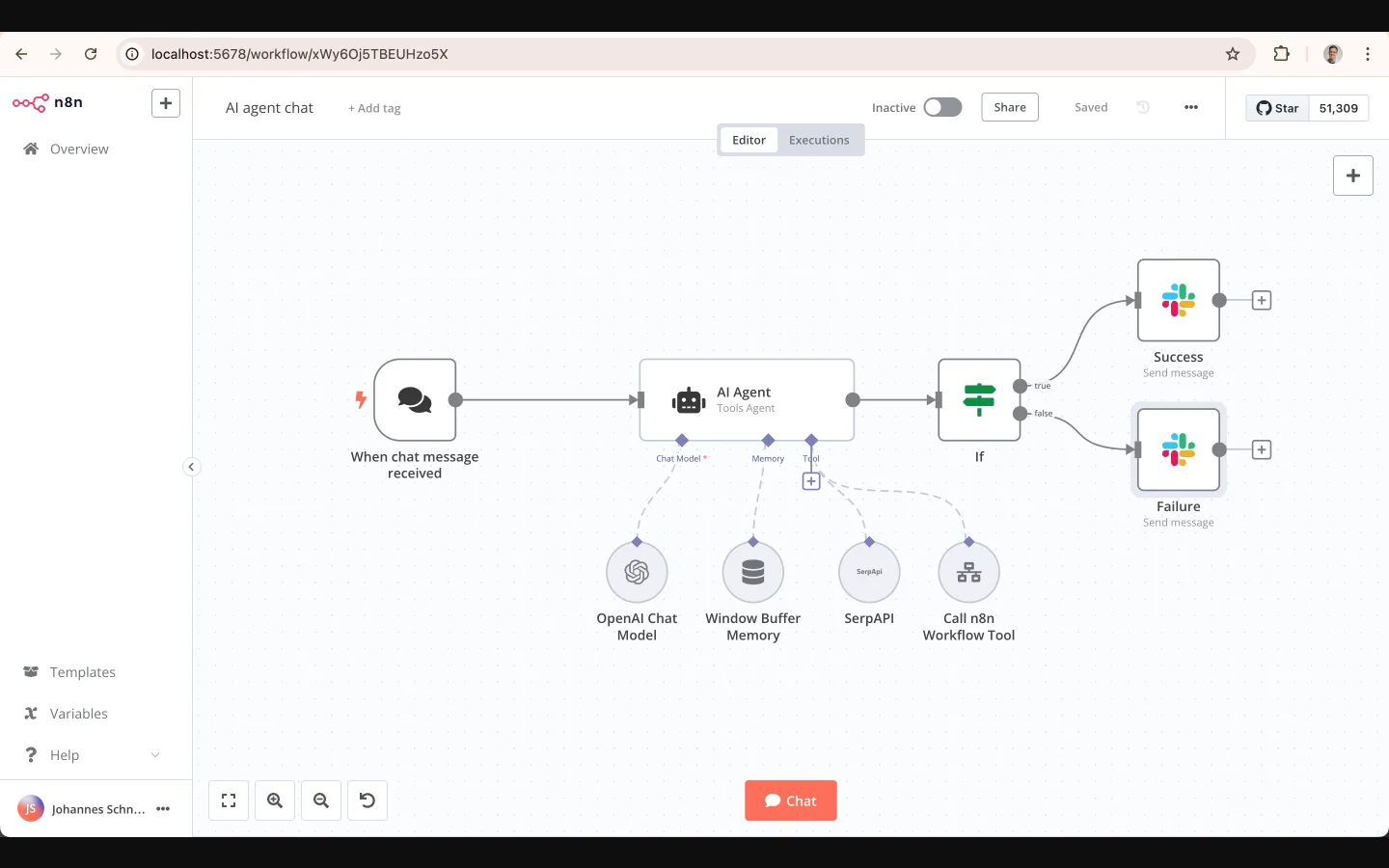
Click + and search for "AI Agent" — it sits under the Advanced AI category. Connect it to your trigger. The AI Agent node has four slots to fill:
- Chat Model — the LLM. Choose OpenAI Chat Model (GPT-4o / GPT-6), Anthropic Chat Model (Claude Sonnet), Google Gemini, or a local model via Ollama. For beginners,
gpt-4o-minior a Claude Haiku-class model is cheap and fast. - Memory — Window Buffer Memory keeps the last N messages (start with 5). For production support, use Postgres Chat Memory so context persists across restarts and per-user conversations stay separated.
- Tools — the capabilities the agent can call: web search (SerpAPI), HTTP requests, calculators, or any other n8n workflow exposed as a tool.
- System Message — the instructions that define the agent's role and behavior (Step 4).
Step 3: Give the Agent Tools
Tools are what make an agent an agent. Without them it's a chatbot. Start with:
- SerpAPI / web search tool — the agent can look up current facts.
- HTTP Request tool — call any API (your CRM, your docs, external services).
- Call n8n Workflow tool — expose another workflow as a reusable tool (e.g., a "look up order status" workflow becomes a tool the agent calls when relevant).
Important: In 2026, prefer the Tools Agent type over the classic ReAct agent — native tool-calling is significantly more reliable in practice (fewer malformed tool-call loops).
Step 4: Write the System Message (The Part That Matters)
The system prompt defines the agent's behavior. A reliable pattern:
You are a helpful customer-support agent for Acme Inc.
- Use the knowledge-base search tool BEFORE answering product questions.
- Use web search to check current pricing or known issues.
- If you cannot find a confident answer after two tool calls, say "I need to escalate this to the team" and include the question.
- Always cite the source you used.
- Keep answers under 150 words unless asked for detail.
Three rules that prevent flaky agents:
- Give it an identity and scope ("you are a support agent for X").
- Tell it when to escalate — an agent that never admits uncertainty is worse than one that escalates.
- Bound the output — length and citation rules keep answers usable.
Step 5: Add the Output (Where the Work Lands)
Connect the AI Agent node's output to where the result goes:
- Slack / Telegram — post the answer to a channel.
- Webhook response — reply to the calling system.
- n8n Chat — for interactive testing.
- Google Sheets / CRM node — log the conversation or write a record.
For the first build, keep it simple: test in the n8n chat, then swap in Slack so you can trigger it from your phone.
Step 6: Test, Measure, and Iterate
Run your agent on 10 realistic questions. Track:
- Completion rate — how many it answered correctly.
- Tool-call accuracy — did it call the right tool at the right time?
- Escalation rate — did it escalate when it should?
Tuning tips from our own testing:
- When the agent calls tools too often, shorten the system prompt so it only searches when the knowledge base has no answer.
- When the agent never calls tools, add an explicit instruction to always check the knowledge base first.
- When answers drift off-topic, add memory or a retrieval node with your docs.
Our 3-week n8n test (documented in the n8n Review 2026) hit 16/20 correct on realistic support questions after tuning; the failures were stale-search cases where the agent didn't push back — exactly what better system prompts fix.
No-Code Alternatives If n8n Isn't Right
- Dify — agent builder + RAG + LLMOps in one UI; Community Edition free. See our Dify vs Coze comparison and Dify vs LangChain 2026.
- Zapier Agents — easiest if you're already on Zapier; more expensive at volume.
- Coze — fastest for publishing bots to Discord/Telegram/web.
- ChatGPT Agent / Claude with tools — no canvas, but zero-setup agents at $20/mo; see Best AI Agents 2026.
For a framework comparison and market context, our AI tools comparison guide and Best AI Comparison Tools 2026 are good starting points.
Frequently Asked Questions
Can I really build an AI agent without coding?
Yes. n8n, Dify, Zapier Agents, and Coze all build working agents on a visual canvas. The AI Agent node in n8n assembles Chat Model + Memory + Tools without code; you only type the system prompt. Code becomes optional — add JavaScript/Python nodes later if you want custom logic.
How long does it take to build an AI agent?
The first agent typically takes 30-60 minutes: deploy n8n (or open Cloud), add a trigger + AI Agent node, connect a model and one or two tools, write a system prompt, and test. A production-grade agent with retrieval and escalation takes a few hours of tuning.
How much does it cost to build and run an AI agent?
Build: $0 with n8n Community self-hosted (pay only ~$5-20/mo for a VPS) or from ~€20/mo on n8n Cloud. Run: LLM API costs at hobby volume are roughly $5-20/mo with small models (gpt-4o-mini / Haiku-class); a free web-search tool keeps tool costs at $0. Enterprise multi-agent systems scale higher.
What is the AI Agent node in n8n?
It's n8n's LangChain wrapper that manages the agent reasoning loop: it receives input, decides which tools to use, calls them, and produces a response. You configure four slots — Chat Model, Memory, Tools, and System Message — and connect it to a trigger and an output.
Do I need an OpenAI or Anthropic API key?
To use their models, yes — the AI Agent node needs credentials for whichever Chat Model you pick. You can also use local models via Ollama with no API key and no per-token cost. n8n Cloud recently added Gateway credits so you can try agents without bringing your own provider key.
What's the difference between a tools agent and the classic ReAct agent?
A tools agent uses native LLM tool-calling — the model declares a tool call in structured form, which is reliable and fast. The classic ReAct agent parses text-based reasoning ("Thought/Action/Observation") which is more prone to malformed loops. In 2026, prefer the Tools Agent type for production.
Can an AI agent use my existing workflows as tools?
Yes — that's one of n8n's strongest features. Any n8n workflow can be exposed as a tool the agent calls (e.g., an "order lookup" workflow becomes a tool). The same canvas also supports MCP: agents consume external MCP tools, and workflows can be exposed as MCP servers for Claude/Cursor/ChatGPT.
Final Verdict
Building an AI agent in 2026 no longer requires a developer. n8n's visual AI Agent node gives you the full agent architecture — trigger, brain, memory, tools, output — on a canvas, and the free Community Edition removes the cost barrier entirely. The real work is prompt engineering and testing, not plumbing. Start with one workflow-level agent, put a real task through it, tune the system prompt, and you'll have a production-usable agent in a weekend.
If you want to see where agents fit in the broader tool landscape, read our Best AI Agents 2026: 15 Autonomous Tools That Actually Work and the AI Agent vs Chatbot guide before you commit to a stack.
Data sources: n8n official docs and workflow templates (verified Oct 2026), n8n Agents announcement (n8n blog, Sep 2026), n8n AI Agent docs (verified Oct 2026), Xelionlabs n8n agent guide (Mar 2026), BigAiAgent n8n beginner guides (2026), Strapi n8n agents tutorial (Jul 2026). Build steps verified against these sources; model pricing and features change, check provider pages for current figures.