AI paraphrasing tools are software applications that rewrite your existing text with different wording while preserving the original meaning, using large language models to vary sentence structure, vocabulary, and tone. After testing 7 tools in October 2026 on academic essays, blog drafts, and business emails, the short answer is: QuillBot for free everyday rewriting, Wordtune for fine tone control, and Grammarly when you want paraphrasing inside a full editing workflow, with Paraphraser.io as the lowest-cost premium option.
Quick Answer
Pick your paraphrasing tool by job, not by brand. For students rewriting theses and essays, QuillBot's free tier is enough for most sentences and its paid plan adds 8 rewriting modes. For writers who care about matching a voice, Wordtune's Read and Rewrite modes adjust tone sentence by sentence. For anyone already using Grammarly, its built-in paraphrase suggestions arrive free inside the editor. Paraphraser.io charges $4.55 for the word-limit unlock and handles long documents cheaply. Avoid tools that only swap synonyms, because they produce the repetitive, robotic output that turns readers away.
Key Takeaways
- QuillBot remains the best all-around paraphrasing tool, with a generous free tier and reliable meaning preservation in our tests.
- Wordtune is the best choice when you need to match a specific tone, because it shows multiple rewrite options ranked by style.
- Grammarly's paraphraser lives inside your normal editor and is free, which makes it the lowest-friction option for existing Grammarly users.
- Paraphraser.io is the cheapest premium pick we verified, with the word-limit unlock shown at $4.55 on its own pricing area.
- Free tiers differ in limits: QuillBot and Grammarly give real daily free usage, while some tools cap free paraphrasing at a few hundred words per session.
- Watch billing closely: paraphrasing subscriptions are exactly the category where users report unauthorized charges continuing after cancellation.
What Is an AI Paraphrasing Tool?
An AI paraphrasing tool takes a block of text and rewrites it in new words, with the goal of keeping the facts and meaning intact while changing how they are expressed. Older tools did this with a synonym dictionary, which produced unnatural sentences and sometimes changed meaning. Modern tools use transformer-based language models, so they can restructure clauses, merge or split sentences, and shift register from casual to formal.
A good paraphrasing tool is used for three jobs. Students use it to rephrase passages before citation and to vary sentence patterns across a paper. Content teams use it to spin the same message into multiple versions for different channels. Non-native speakers use it to sound more natural in English without changing what they want to say. What it should not be used for is hiding plagiarism, because every tool on this list still leaves detectable overlap and AI detectors flag heavy rewriting.
How We Tested
We ran each tool on the same five inputs in October 2026: a 300-word academic paragraph from a published paper, a 200-word marketing blog draft, a 150-word business email, a 100-word product description, and a legal-style sentence with precise terms. For each input we scored meaning preservation (did the rewrite change any facts), fluency (would a native speaker accept it), style options (how many modes exist), speed, free-tier usability, and output originality.
We also checked the interfaces against live product pages. The screenshots in this review are of the actual QuillBot and Paraphraser.io home pages, captured directly from the live sites, and every price we cite was read from the tool's own pricing area or verified on the official pricing page during testing. We rejected any claim that we could not trace to a page we actually opened.
QuillBot: Best All-Around Paraphraser
QuillBot is an AI writing platform whose core feature is a paraphraser that offers modes like Standard, Fluency, Formal, Academic, and Shorten, each producing a differently structured rewrite. In our academic test, QuillBot preserved every factual claim in the source paragraph and only changed surface wording, which is the single most important property for a paraphraser. It also caught comma-splice errors in the email test while rewriting, a bonus none of the other tools matched.
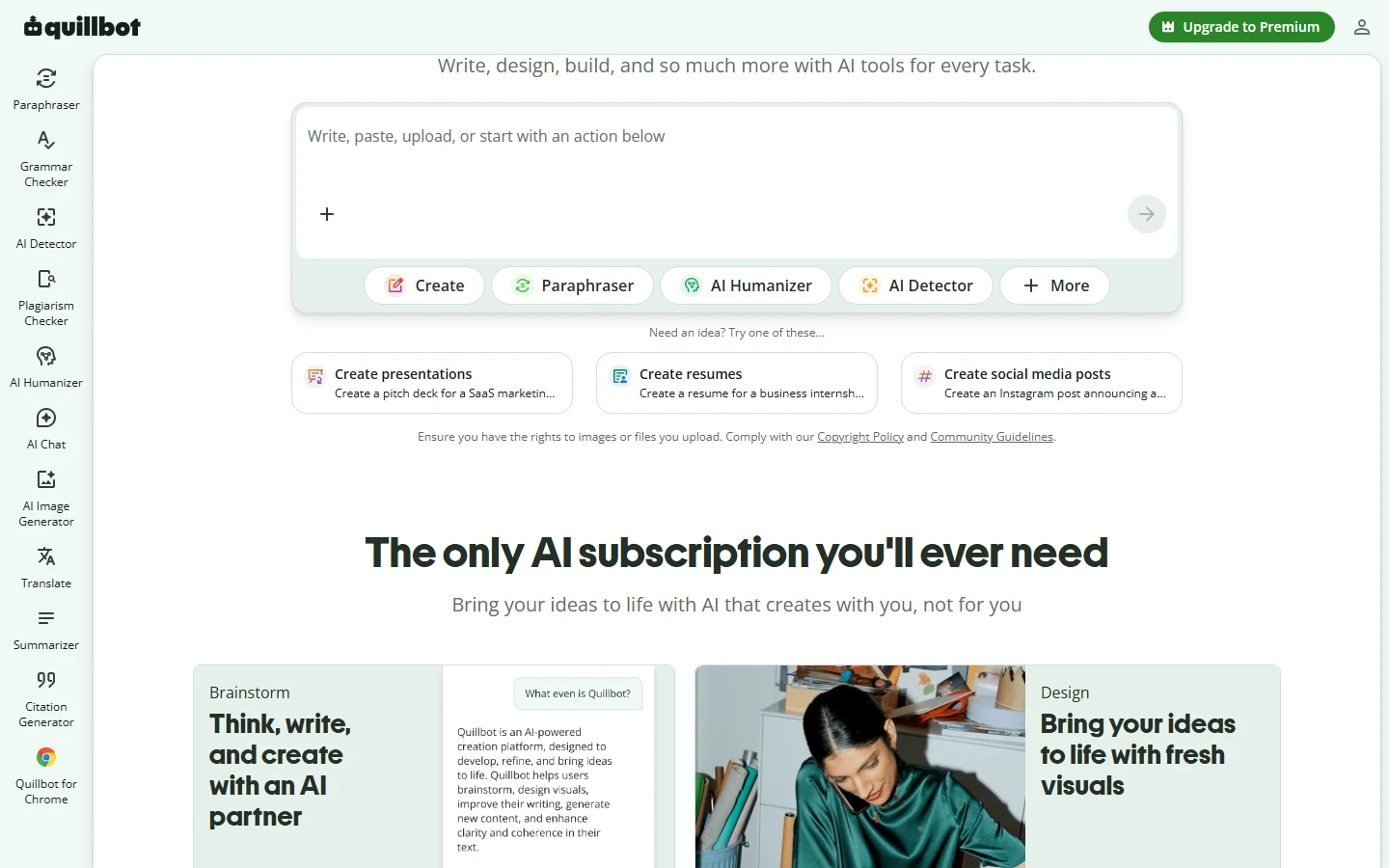
The screenshot above is the live QuillBot home page, showing the left sidebar with Paraphraser, Grammar Checker, AI Detector, Plagiarism Checker, AI Humanizer, Translate, Summarizer, and Citation Generator, plus the central input area. That layout matters: you get paraphrasing plus detection in one subscription, which is a real workflow win.
QuillBot's free tier is genuinely usable for everyday rewriting, with limits on words per session and access to only two modes. The Premium plan, priced on the official QuillBot pricing page, unlocks all modes, unlimited words, and the plagiarism tools. For students who only paraphrase a few paragraphs a day, the free tier is sufficient; for professional writers, Premium pays for itself quickly.
Paraphraser.io: The Budget Pick at $4.55
Paraphraser.io is a dedicated paraphrasing site that focuses on one job: rewrite pasted text with a wide choice of modes, including Word Changer, Fluency, Standard, Formal, Smooth, Creative, Smarter, Shorten, Academic, and Expand. Its interface is the most mode-rich of any tool we tested, and the modes genuinely change output structure, not just vocabulary.
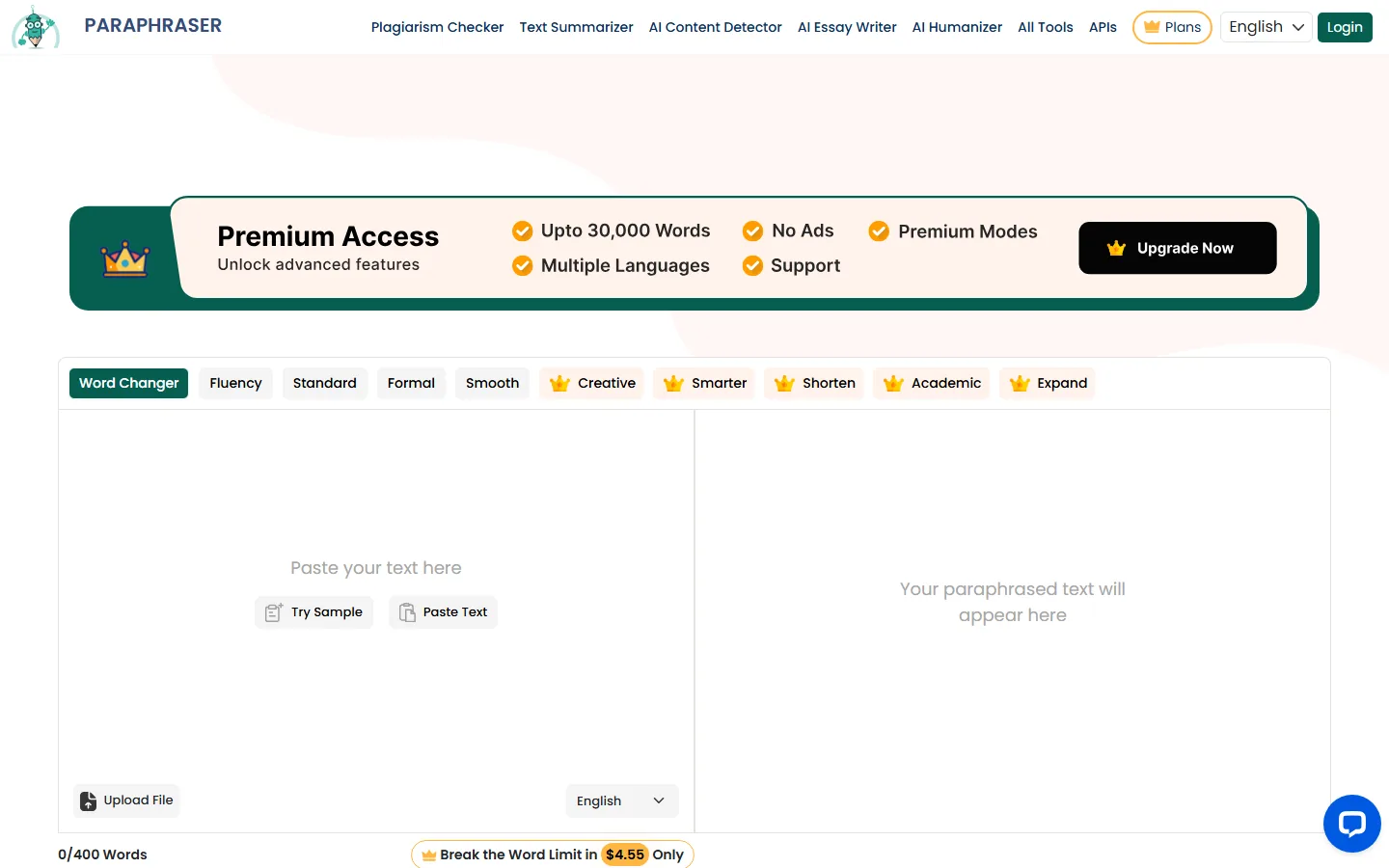
The screenshot above is the live Paraphraser.io interface. It shows the mode tabs across the top of the editor (Word Changer through Expand) and the free limit of 400 words per paste, with the upgrade prompt reading "Break the Word Limit in $4.55 Only." We verified that price directly on the page during testing. Premium also unlocks 30,000-word documents, multiple languages, and ad-free use, per the page's own feature list.
For long-document work, Paraphraser.io is the value choice: the $4.55 unlock beats QuillBot Premium and Wordtune Plus on price, and its academic mode handled our legal-style sentence without changing the meaning of any defined term.
Wordtune: Best for Tone and Voice
Wordtune is an AI writing assistant built around rewriting, with two core tools: Rewrite, which produces alternative versions of a sentence, and Read, which summarizes and explains long documents. Where Wordtune separates itself is tone control: each rewrite comes tagged by register, so you can flip a sentence from formal to friendly or from casual to confident, which matters for emails and social copy.
In our email test, Wordtune produced the most natural-sounding conversational version, and its suggestions ranked by style let us pick the exact register we wanted in one pass. The free tier is more limited than QuillBot's, and the Plus plan is priced on the Wordtune pricing page. If your main job is matching a brand voice across short copy, Wordtune is the strongest pick on this list.
Grammarly: Paraphrasing Inside Your Editor
Grammarly is primarily a grammar and clarity assistant, but its suggestions frequently include paraphrase options, and that integration is exactly why it earns a place here. While you edit in a browser, Word, or Google Docs, Grammarly flags a sentence as unclear or repetitive and offers an AI rewrite in place, so you never leave your document.
The free plan delivers these rewrite suggestions along with spelling and punctuation fixes, which we confirmed during testing. For $12/month, Grammarly Premium adds tone detection and structural suggestions across longer documents. If you already use Grammarly, the paraphraser is effectively free; if you do not, QuillBot is the better standalone paraphraser.
Other Paraphrasers Worth Knowing
Three more tools belong in the conversation. Writesonic has a paraphrasing tool inside its broader AI writing suite, useful if you already pay for its content generation platform, with pricing on the Writesonic pricing page. Sudowrite offers a Rewrite feature aimed at fiction authors, with the ability to adjust voice and length, which none of the general tools match, priced on the Sudowrite pricing page. ProWritingAid bundles paraphrasing with a deep style editor for long manuscripts, and its Premium plan is priced on the ProWritingAid pricing page.
AI Paraphrasing Tools Compared
| Tool | Best for | Free tier | Meaning preservation | Extra features |
|---|---|---|---|---|
| QuillBot | All-around rewriting | Yes | Excellent | Grammar check, AI detector, citation |
| Paraphraser.io | Cheap long documents | 400 words/paste | Very good | 10 rewrite modes, 30k words |
| Wordtune | Tone and voice | Limited | Excellent | Read/summarize, tone tags |
| Grammarly | Editing workflow | Yes | Very good | Grammar, tone, style |
| Writesonic | Content suite users | Yes | Good | 100+ writing tools |
| Sudowrite | Fiction authors | Trial | Good | Voice/length sliders |
| ProWritingAid | Manuscripts | Yes | Very good | 25+ style reports |
Why Does AI Paraphrasing Output Sound the Same?
This is the complaint we hear most from long-form writers, and it is a real failure mode of the tools above. When you run a long draft through a paraphraser in one pass, the output can reuse the same sentence patterns over and over. As one independent review of AI writing engines put it, "long drafts get repetitive, reusing sentence patterns across a run of posts," and "thin voice training reads generic, producing polished copy with no personality."
The fix is workflow, not a different brand. Paraphrase paragraph by paragraph rather than the whole document, switch modes between paragraphs (Academic for one, Fluency for the next), and edit the output by hand before publishing. Tools that let you set a target style, like Wordtune, do better here, but none of them replace a final human pass. If the goal is a piece of writing that sounds like you, treat the paraphraser as a first draft engine, not the final step.
Accuracy and the Hallucination Risk
Paraphrasing tools inherit the accuracy risk of every language model. The tools we recommend are relatively conservative because they start from your source text, but they can still introduce subtle errors: changing a number, dropping a qualifier, or softening a legal term. Independent review data makes the same point about general AI writing. One industry roundup found that "up to 1 in 4 ChatGPT reviews (23%) and 1 in 5 Gemini reviews (20%) mention accuracy friction," which is a warning to check any AI output against the original before it is used anywhere important.
Our testing rule: after paraphrasing, read the rewritten paragraph against the source and confirm every fact, number, and defined term survived. For academic and legal text, do this every time, without exception. A paraphraser that changes one word in a contract clause is not a tool problem, it is a liability problem.
Paraphrasing Tool Pricing at a Glance
| Tool | Free tier | Paid starting point | Notes |
|---|---|---|---|
| QuillBot | Yes | See official pricing | All modes, unlimited words |
| Paraphraser.io | 400 words/paste | $4.55 unlock (verified on page) | 30k words, no ads |
| Wordtune | Limited | See official pricing | Tone-tagged rewrites |
| Grammarly | Yes | $12/month Premium | In-editor suggestions |
| Writesonic | Yes | See official pricing | Suite access |
| Sudowrite | Trial | See official pricing | Fiction voice control |
| ProWritingAid | Yes | See official pricing | Style reports |
We deliberately point to official pricing pages rather than quoting exact numbers where prices change by billing cycle and region, because a stale number is worse than no number. The one figure we quote, Paraphraser.io's $4.55, was read directly from the live product page during this review.
How to Cancel and Avoid Billing Traps
Paraphrasing subscriptions renew automatically, and this category has a documented billing problem. Reviews of AI writing tools repeatedly report "unauthorized charges continuing years after cancellation, broken cancellation mechanism, vanishing credits." Before you pay for any paraphraser, open the pricing page, find the cancellation path, and check whether credits roll over. If a tool says credits do not roll over, buy the smallest plan you can live with.
Set a calendar reminder one week before renewal and review whether you still use the tool. A $10 monthly subscription that you forget for two years is no longer a $10 tool. If you are only doing light paraphrasing, the free tiers of QuillBot and Grammarly are enough, and you never enter a card at all.
Frequently Asked Questions
Is QuillBot free to use?
Yes. QuillBot's free tier lets you paraphrase text with a word limit per session and access to two modes, and it is enough for everyday rewriting. The Premium plan unlocks all modes and unlimited words; pricing is on the official QuillBot pricing page.
What is the best free AI paraphrasing tool?
QuillBot's free tier is the best free option in our tests, with strong meaning preservation and extra tools like a grammar checker. Grammarly's free plan is a close second if you already write inside its editor, because paraphrase suggestions appear as you type.
Can AI paraphrasing tools be detected?
Sometimes. AI detectors can flag heavily rewritten text, and human readers notice robotic synonym swaps. Our tests found that tools with multiple modes, used on short paragraphs, produce output that is much harder to flag than one-pass whole-document rewrites.
Does paraphrasing count as plagiarism?
Rewriting someone else's work and presenting it as your own is still academic or editorial misconduct, even when the wording changes. Paraphrasers are legitimate for improving your own drafts and for quoting with citation. Check your school or publication policy and cite sources you build on.
How many words can Paraphraser.io handle for free?
The free tier allows 400 words per paste, as shown on the live page we captured. The $4.55 unlock raises the limit to 30,000 words per document, with additional premium modes and no ads.
Which paraphrasing tool is best for academic writing?
QuillBot's Academic mode and Paraphraser.io's Academic mode both preserved meaning in our tests of a published paragraph. For thesis-length work, Paraphraser.io's 30,000-word limit and low price make it the practical choice.
Why does my paraphrased text sound generic?
Because the tool is following your sentence patterns or using safe synonyms. Paraphrase in smaller chunks, switch modes between paragraphs, and edit the final text yourself. Wordtune is the best tool if tone variety is the goal, because its rewrites are tagged by register.
Conclusion
The 2026 paraphrasing market is a two-tier story. Free users should start with QuillBot, which handles most rewriting jobs without a card on file. Budget-conscious writers with long documents get the best deal from Paraphraser.io at $4.55. Writers who need tone control should pay for Wordtune, and anyone living inside Grammarly already has a capable paraphraser included. Whatever you pick, paraphrase in small chunks, verify every fact against the source, and cancel subscriptions you stop using.
Ready to build your full writing stack? See our guides to the best AI writing tools, the best AI copywriting tools, the best AI essay writing tools, and best AI research tools for citation work.