Quick Answer: Three free AI voice changers actually deliver no-sign-up access in 2026: Free.ai (590 models, no watermark, roughly 500 tokens per use), Audio Converter (unlimited free voices daily, 30 free HD minutes daily), and open-source voice conversion (truly unlimited but needs Python setup). Voicemod and Voice.ai are permanently free with rotating libraries of 3 to 6 voices, while Clownfish is free forever for effects only. Avoid any tool that asks for a credit card before you hear a voice sample.
An AI voice changer is software that re-synthesizes your speech in the timbre of a target voice using a neural network, as opposed to a pitch-shift effect that only alters frequency. Real AI voice conversion needs real compute, so free tiers usually cap voice count, rotate the library, or watermark output. This guide tests seven genuinely free options as of October 2026, tells you exactly what stays free, and flags the paywalls that hide behind the word "free".
Which Free AI Voice Changer Is Actually Free in 2026?
The honest answer depends on what you are willing to trade. Based on independent testing published in May 2026 and our own October 2026 verification of official pages, only one category is truly unlimited: open-source voice conversion, which runs locally on your own hardware. Consumer apps fall into three buckets: permanently free with a small rotating library (Voicemod, Voice.ai), free effects with paid AI voices (FineVoice, MagicVox, Clownfish is effects-only by design), and time-limited full trials (VoxBooster at 3 days, MagicMic at 7 days). Web tools such as Free.ai and Audio Converter are free per-use with token or daily caps.
| Tool | What is actually free | Where the wall is | Platform |
|---|---|---|---|
| Open-source voice conversion (RVC) | Everything, no cap, no watermark | Python 3.10+ and CUDA setup, no polished UI | Windows, Linux |
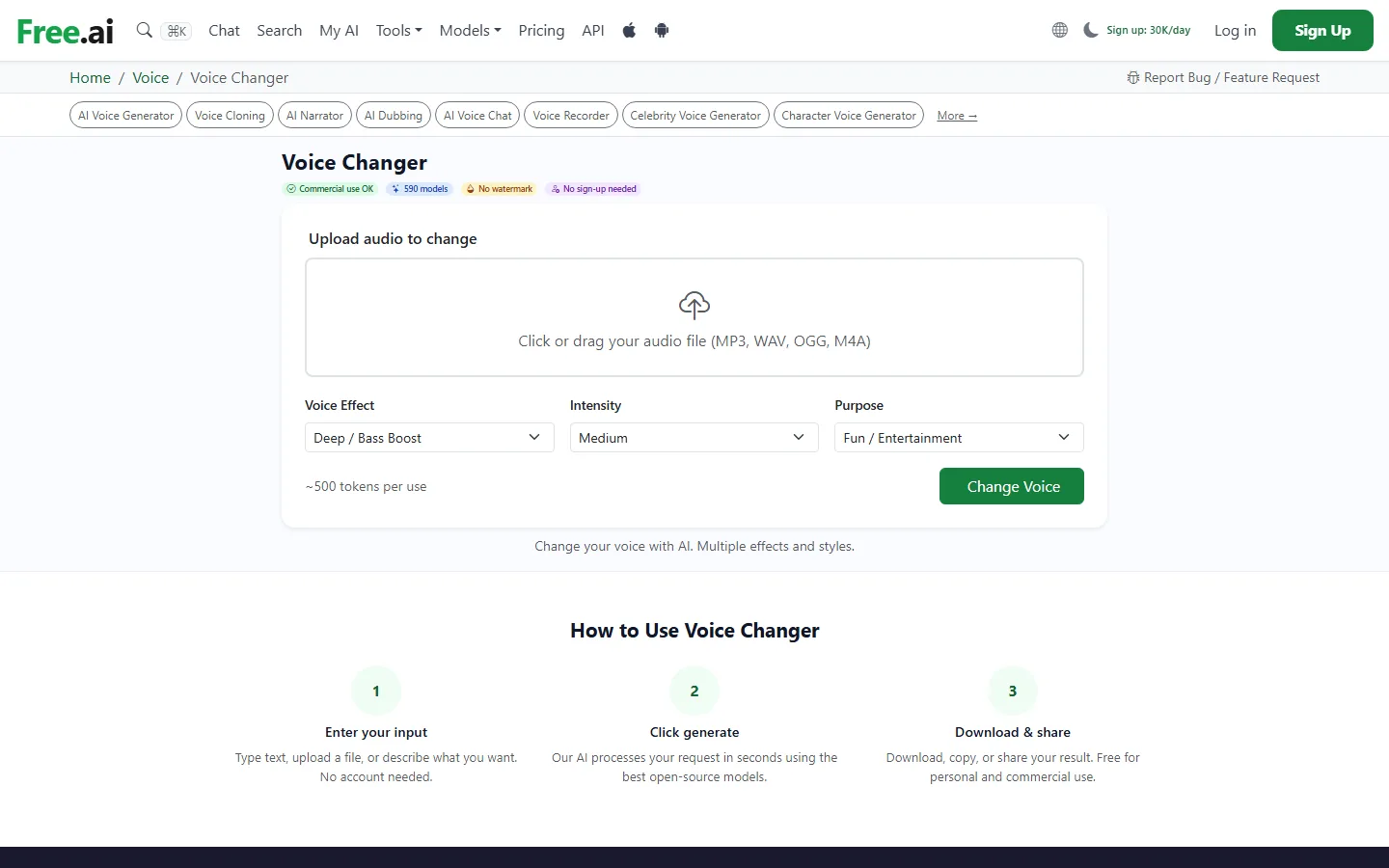
| Free.ai | 590 models, no watermark, no sign-up | Roughly 500 tokens per conversion | Web |
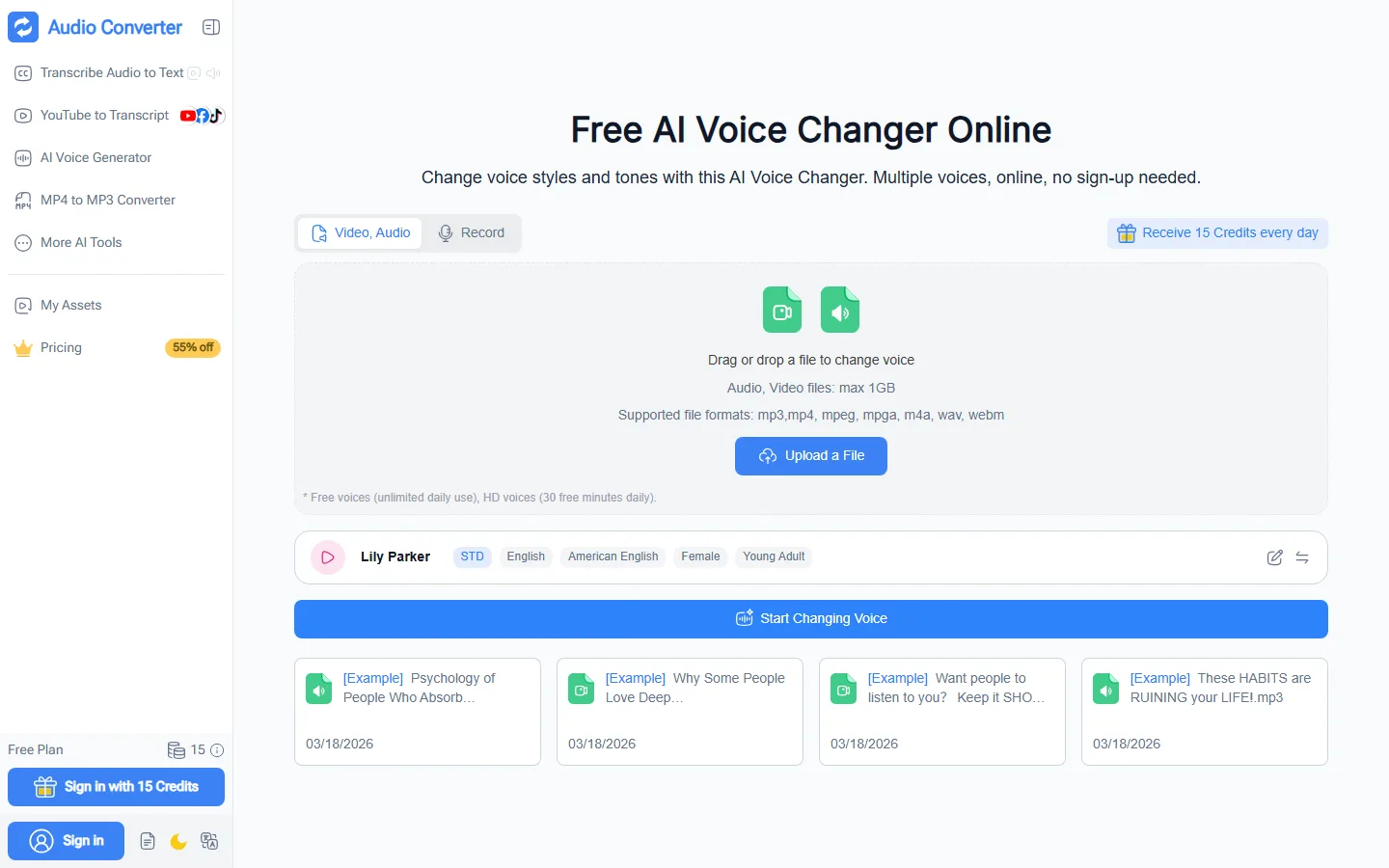
| Audio Converter | Unlimited free voices daily | HD voices capped at 30 free minutes daily | Web |
| Voicemod | Rotating 3-6 AI voices, all DSP effects | Full library paywalled, no custom models | Windows, Mac |
| Voice.ai | Community voice subset | Full library paywalled, no model import | Windows |
| Clownfish | All effects, forever, no account | No AI cloning at all, DSP only | Windows |
| VoxBooster | Full app for 3 days | No permanent free tier | Windows |
Is Voicemod Really Free, or Is It a Trap?
Voicemod is permanently free, not a trial, which makes it the most popular free option for Discord and gaming. The official site confirms a free version with a rotating selection of voice changing options, a permanent clean mic effect, and a soundboard, and independent testing published in May 2026 by VoxBooster reached the same conclusion with more detail. Independent reviews in 2026 describe the free tier as roughly 3 to 6 AI voices that shuffle on a schedule, so the voice your persona depends on today can vanish tomorrow. All DSP effects, including robot, pitch shift, and the classic deep demon, stay unlocked. AI voices run at 150 to 250 ms latency, while DSP effects stay under 15 ms. Voicemod works in Discord by installing a virtual microphone that you select under User Settings, Voice and Video. The catch is that the full AI library, custom voice models, and unlimited soundboards sit behind Voicemod Pro. If you only need a couple of voices for fun, the free tier is enough, and it never expires.
What Is the Best Free AI Voice Changer With No Sign-Up?
If "no sign-up" is the hard requirement, two web tools pass our check. Free.ai's voice changer page states commercial use is allowed, lists 590 models, shows no watermark, and explicitly says no sign-up is needed; each conversion costs roughly 500 tokens on a free account. Audio Converter's online voice changer also advertises no sign-up, unlimited free voice use daily, and 30 free minutes of HD voices daily, with a 15-credit daily grant on the side. Both are browser-based, so there is nothing to install and no Discord routing to configure; you upload a clip, pick a voice, and download the result. The trade-off is that file-based web converters do not work live on your microphone, which matters if you want to change your voice during a call. For that, you need a desktop app with real-time inference, and the only unlimited one is open source.
Why Does the "Free" Tier Always Run Out of AI Voices?
Running neural voice conversion costs real money in GPU compute, so no commercial company gives unlimited AI voices for free. Independent analysis published in May 2026 found that most consumer apps give 3 to 10 free AI voices, then require a subscription, and that web tools that call themselves free usually watermark output or cap daily usage. The one exception is open-source voice conversion: because inference runs on your own GPU and the code is public, there is no per-use cost, no cap, and no watermark. The price you pay is setup. You need Python 3.10 or newer, a CUDA toolkit, and comfort running commands in a terminal, and a capable NVIDIA GPU keeps real-time latency between 60 and 150 ms. Users who do not want that friction should treat "free AI voices" as a rotating preview and expect to pay if they need one consistent voice.
What Do Real Users Complain About Most With Free Voice Changers?
The complaints that show up again and again in store reviews and community threads are not about voice quality. They are about billing and support. One recurring review pattern is the tool that works during the trial and then charges without warning, a pattern one reviewer described as "unauthorized charges continuing years after cancellation". Another pattern is the app that stops working after purchase, where users report "after you have bought it there's no one to answer your queries". A third pattern is price convergence, where every paid voice changer settles around the same monthly price and choosing on features becomes impossible, the same $19.99 to $20 per month crowding that already happened in AI assistants. For all three complaints, the free options in this guide are the safe starting point: no card to charge, no support ticket to file, and no subscription to cancel.
Free AI Voice Changers vs Paid AI Voice Changers: Where Is the Line?
The line is drawn at consistent access and custom voices. Free tiers work well for casual use: funny Discord effects with friends, trying AI voice changing for the first time, and testing whether a paid upgrade is worth it. Clownfish or Voicemod's free effects handle the funny-effects case with zero friction, and Voicemod's rotating voices or a web tool handle the first-time test. Paid tiers exist for three specific needs: consistent access to one specific voice that never rotates away, custom voice training or model import, and bundled tools like soundboard, noise suppression, and dictation in one app. Independent testing in 2026 also found that free and open-source tools update at volunteer pace, while paid tools carry active Windows compatibility maintenance. If you stream or make content where your voice is part of your identity, budget for a paid plan. If you just want to mess with friends, stay free.
Does a Free AI Voice Changer Work on Discord in Real Time?
Yes, with the right tool. Desktop apps route through Discord in one of two ways: they install a virtual microphone that you select in Discord's Voice and Video settings, which is how Voicemod works, or they intercept audio before it reaches any app, so Discord keeps showing your original microphone, which is how some newer tools work. Real-time latency matters in voice chat: DSP effects stay under 15 ms and are invisible in conversation, AI voices run between 80 and 500 ms depending on hardware, and under 300 ms is generally fine for casual calls while under 150 ms is needed for fast banter. Web-based converters with no sign-up cannot be used live in Discord because they process files, not your microphone stream. For live Discord use, pick a desktop tool with real-time inference and check its latency on your actual GPU before committing.
FAQ
Q: Is there a truly free AI voice changer with no time limit?
A: Yes. Open-source voice conversion is free and open source with no time limit, no usage cap, and no watermark, but it requires Python, CUDA, and command-line setup. Among consumer apps, Voicemod, Voice.ai, and Clownfish offer permanent free tiers with restrictions, and web tools like Free.ai and Audio Converter are free per use with token or daily caps.
Q: What does "free tier" actually mean for AI voice changers?
A: Usually it means a limited voice count of 3 to 6 AI voices, watermarked or capped output on web tools, or features gated behind a subscription. Independent testing found that only open-source software gives unlimited AI voice changing for free, because the GPU inference cost is not zero.
Q: Can I use a free AI voice changer on Discord?
A: Yes. Most Windows desktop voice changers route through Discord automatically, either through a virtual microphone you select in Voice and Video settings or by intercepting audio before it reaches the app. Free tiers generally allow Discord routing, and it is the AI voice library that gets restricted, not the routing itself.
Q: Which free AI voice changer sounds the most realistic?
A: Open-source voice conversion with a trained model sounds the most realistic because you can import any model, including cloned voices trained by the community. Among no-setup apps, Voicemod's free rotating voices and Voice.ai's community library are the most convincing, with real-time latency between 100 and 250 ms on a GPU.
Q: Are free AI voice changers safe to use?
A: Local processing tools such as open-source voice conversion and Voicemod's free tier never send your voice to remote servers, so they are safer from a privacy standpoint. Web-based tools send audio to cloud servers, so review each app's privacy policy before using it with anything sensitive.
Q: What hardware do I need for a free AI voice changer?
A: For real-time AI voice cloning, an NVIDIA GPU with 6 GB or more VRAM gives the best results at 80 to 150 ms latency. Without a GPU, CPU-only inference runs at 250 to 500 ms, which is usable for casual Discord but noticeable in fast conversation. DSP-only effects run smoothly on any modern CPU.
Q: How do I stop a free voice changer from charging me later?
A: Use tools with no credit card requirement at signup, and treat any trial as a timer: note the trial end date, cancel at least 24 hours before renewal, and watch for charges on the same card for a full billing cycle after cancellation, because reviewers report "unauthorized charges continuing years after cancellation" with some tools.
Conclusion
Free AI voice changers split into two honest categories in 2026: permanently free with a small rotating library, and truly unlimited but technical. For most people, Voicemod's free tier is the best zero-risk start because it is permanent, works in Discord, and never asks for a card. For no-sign-up browser use, Free.ai and Audio Converter deliver working free conversions with daily caps. For users who need one consistent voice with no subscription, open-source voice conversion is the only unlimited option, and its Python setup is the price of freedom.
CTA
Start with the tool that matches your tolerance for setup: try Voicemod's free tier today if you want Discord-ready voices in minutes, or test a no-sign-up web converter first to hear what AI voice changing actually sounds like before you install anything. Read our full best AI voice changers 2026 roundup and the open-source AI voice changers guide for the deeper comparison, and check best AI voice cloning tools if custom voice clones are your real goal. New to the category? Start with AI tools for beginners to understand which free tiers matter, and see our ElevenLabs v2 review for how the paid side compares.